Drilldown Burst
A Drilldown Burst attaches a sub-report to a regularly run report so users can drill from a row into related detail for audit or analysis. It is created the same way as a Master (Bring Back) Burst — a sub-report attached through a Burst calculation — with one key difference: a drilldown returns no burst columns to the main report. Instead, the sub-report is opened on demand, in a new window, showing only the data related to the rows the user selected.
The Core Pattern
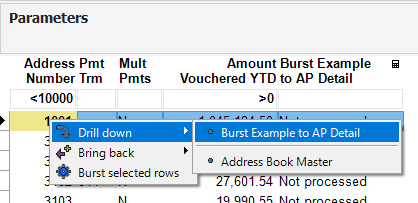
The sub-report is attached to the main (driver) report through a Burst calculation, but with Burst on Run turned off — nothing is generated when the report runs. When a user is looking at the report and needs supporting detail, they highlight the row(s) of interest, right-click, and choose the drilldown from the menu. Only then is the sub-report queried, and it opens alongside the main report for side-by-side comparison.
In addition to — or in lieu of — the DAS default drilldowns, you can attach one or more custom drilldown reports this way. When a user right-clicks a row, any custom drilldowns you created appear in the menu, along with any default DAS drilldowns available for that data.
A Running Example
This section follows the same A/P example used in the Master (Bring Back) Burst section. There, a Supplier Master (F0401) report brought back summarized amount values from an AP Detail (F0411) sub-report. Here, that same Supplier Master report instead lets a user drill into the AP Detail on demand.
| The main (driver) report | Drills into | Matched on |
|---|---|---|
| Supplier Master | AP Detail sub-report | Vendor (Address Number) |
No values are returned to the driver — the drilldown simply opens the matching payment detail for the selected row(s).
Before You Start
This page orients you to what a Drilldown Burst does; the pages that follow walk through adding the drilldown burst calculation and reviewing it in action. The setup concepts shared by every burst type — Report Selection, Burst on Run, Which Rows to Burst, Activation Condition, and Lookup Values — are covered in Concepts Common to Every Burst.