Create a New Scheduled Task
In Data Access Studio, a Task is defined as a set of reports scheduled to run at a certain time. To schedule a report or set of reports, you must define or create a new Task:
On the Main Menu, click Schedule -> Edit Schedule
On the form that appears, click New Task
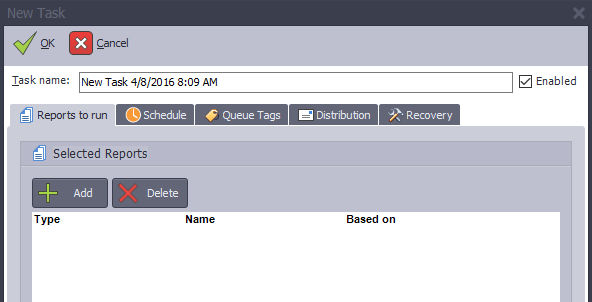
| To | Do this |
|---|---|
| Name your Task | Type a new name in the Task name edit box. |
| Enable/Disable your Task | Check the Enabled check box to enable the Task. Un-check the box to disable it. You many want to disable a Task so that its definition exists (for future use, copying, etc.) but the Task will not actually run. When a Task is disabled, all the edit options for the Task are disabled as well. |
| Select what report(s) you want to run | See Specify What You Want to Run. |
| Specify when you want to run your report(s) | See Specify When You Want to Run it. |
| Tag your task | See Queue Tags |
| Distribute your reports | See Task Report Distribution |
| Set recovery options | See Recovery Options |
| To save your changes | Click  OK. OK. |
| To cancel your changes | Click  Close. Close. |